




Make it yours before you change the light.
01 · Choose the site
For one property, edit Home’s Sun Stage, the shared Sun Plate and Sun Clock. For a small catalogue, edit the Properties collection; each record powers its own detail page. The home page is a separately authored feature, so update it when you change the featured property.
02 · Add the essentials
Give each property a title, location, guide price and concise specification rows: LABEL|VALUE, one per line. Add your own floor-plan image. With no uploaded plan the site shows an illustrative daylight study, not a surveyed plan. Keep headings to two or three short lines.
03 · Supply the photographs
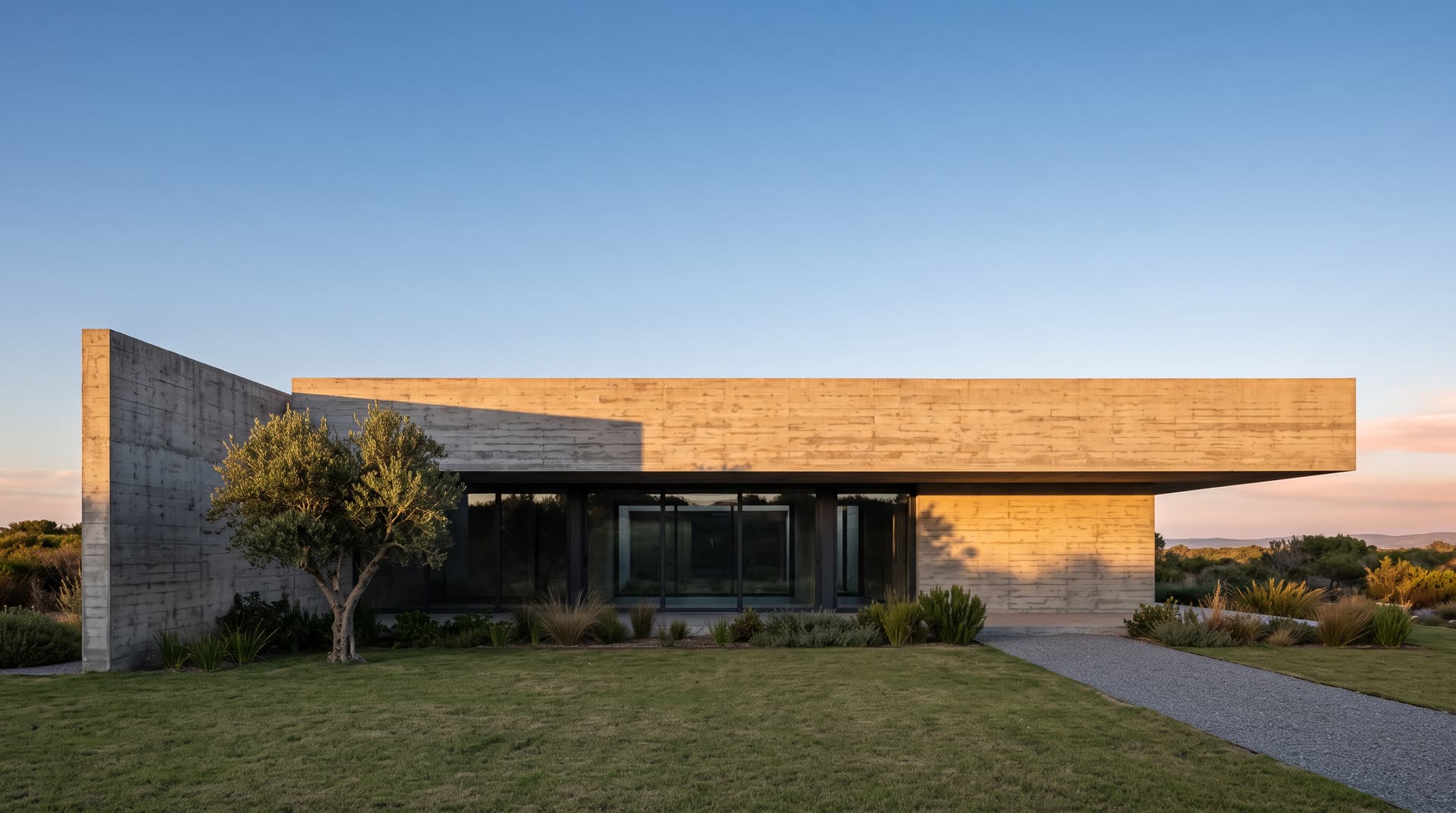
Supply six matched photographs: 06 Dawn, 09 Morning, 12 Noon, 16 Afternoon, 19 Dusk and 00 Midnight. Keep the camera, crop and building geometry fixed across the set. The included demonstration frames are already aligned. Replacement images use your own crop and nudge controls; do not reuse the demo calibration. Missing images hold a supplied frame, so supply all six for a distinct full-day tour. Room images are optional and empty slots are hidden.
04 · Connect the enquiry
Select Property Enquiry on Contact. Add your email and, optionally, phone number. Email opens the visitor’s mail application with the selected property and page link included. There is no built-in inbox or form backend. An empty email keeps the demonstration notice. Test the resulting email draft without sending it.
05 · Check before publishing
Replace both demonstration records, their figures and their photographs. Check Home and every CMS detail at phone, tablet and desktop sizes; inspect all six views and both directions of navigation. Confirm titles, prices, units, links, empty catalogue, actual photo rights, page metadata and enquiry destination. The sun is computed from the latitude, season and bearing you set, by standard solar geometry: a faithful guide to the light, not a surveyed solar study.
06 · Keep time and surfaces together
The section order is House → 06 Dawn; Orientation → 09 Morning; Plan → 12 Noon; Day → 16 Afternoon; Rooms → 19 Dusk; Specification → 00 Midnight. Sun Stage has one Hour control per section; 24 means midnight at the end of the day. The tour uses these authored hours even when a standalone clock uses Live. Choosing a photograph or a dial tick temporarily changes the hour; entering another section restores its assigned hour. In Sun Clock, Bar opacity and Frost now control the header, footer and sundial together. The dial’s Arc, Readings, Density and Opens on controls remain editable.
Drag F to the way the main facade faces, and CAM to where the photographs were taken from. The dashed line is the day's sun path, seen from above.
In Framer: Sun Clock → Facing 214, Camera looks 34, Latitude 45.2, Season May. For a property in the CMS they go in its Bearing, Camera Looks and Latitude fields.
dawn
morning
noon
afternoon
dusk
midnight
00 · WHAT THIS IS
A property template with a light system instead of a colour scheme.
Every colour is derived from one number: the time of day. You art-direct four colours and the physics derives the rest. There is no palette to keep consistent by hand and no dark mode to maintain separately. Night is just a low sun.
THE ONE NUMBER
The hour, 06:00 to midnight. Every token, every shadow and every contrast decision comes off it.
01 · THE FRAME
One frame. It does not scroll. The content changes inside it.
Scrolling steps through the six views and then carries on to the next page; scrolling back walks it in reverse. The photograph, the header, the readout and the footer never move. On a phone the readout collapses to a square badge under the wordmark that morphs open when tapped.
02 ORIENTATION
09:00 · the sun path over the house, and its figures
03 THE PLAN
12:00 · a plan is a noon drawing
04 THE DAY
16:00 · the six hours side by side
05 THE ROOMS
19:00 · the other cameras
06 SPECIFICATION
00:00 · the rest of it, in numbers
02 · THE TEXT IS THE CONSTANT
Everything supporting the type sits above it.
The headline lands on the same line in every view, because its distance from the foot of the frame is its own height and nothing else. Put a card below the type and that card’s height starts deciding where the type sits, which is what makes the eye hunt for the line it was reading.
MEASURED
Check every section at each breakpoint after changing its content.
WHY NOT A FIXED GAP
A constant gap only makes the empty space consistent. The position has to be the constant.
03 · MANY PROPERTIES
The bearing is a field, so every listing gets its own day.
Add a property to the Properties collection and it gets a page. Because the bearing is a collection field rather than a constant, a north-facing house genuinely has a different day: at 06:00 a south-west façade reads IN SHADOW while a north one reads DIRECT SUN, and every derived token follows.
Properties
The collection. One item is one listing.
/properties
The index. Every property as a full-screen panel, arranged by count.
/property/:Properties
The detail page: the same frame, bound to one item.
THE SIX HOURS
Per property. Until a house has its own shoot they can share one set.
THE SINGLE PAGE
The home page is still a single-property showcase. Both ways work.
04 · COLOUR
Two routes in. You will almost always want the first.
Give a layer one of the colour styles in the ordinary Framer picker and it relights with the sun: no naming convention, no code. Framer compiles every colour style to a custom property and Sun Clock writes the derived value straight into it. The second route is for things a colour alone cannot express.
USE A COLOUR STYLE
Ink, Surface, Accent and the rest. It follows the light on its own.
OR NAME THE LAYER
Append ink, ink-muted, ink-faint, accent, bg-base, bg-surface or rule to a layer name.
cast
Type standing on the photograph: white, with a shadow along the sun vector.
card
A frosted pane: background, radius, blur and hairline in one word.
casts
Anything that should take the building shadow, in the same direction and softness.
YOUR BRAND
Set Brand colour on each page’s Sun Clock. The accent (the Enquire button, links, the dial’s line and live readings) takes your colour’s hue at every hour, while its lightness still follows the sun, so it reads against every sky. Strength at 100 holds your colour all day; lower lets dawn and dusk warm it. For every page at once, add :root{--aspect-brand:#1d4ed8} to the same style line as the fonts (Settings > Code). Leave both empty for the light’s own brass to bronze.
05 · SURFACE
One material for every surface, moved by four numbers.
The header, the footer, the readout and the cards are the same frosted pane. Radius, Frost, Card opacity and Bar opacity on Sun Clock move all of them together, so the chrome can never drift away from the content.
Radius
Real squircles where the browser has corner-shape, a plain radius elsewhere.
Frost
Backdrop blur behind every pane.
Card opacity
How much ground the content panes carry.
Bar opacity
The chrome needs more than a card: its text must stay legible over any photograph.
Bar inset
How far the header and footer float off the edges.
06 · MOTION
Four techniques, chosen by what is moving.
Display type gets the real morph: blurred through an alpha threshold so glyphs fuse and split. Small labels slide behind a mask, which is transform-only and costs nothing. Cards and tables blur without the threshold, because a threshold at that size is mush. The photograph is different again: it arrives through a radial mask that opens FROM WHERE THE SUN IS, and the origin travels as the sun climbs.
THRESHOLD
Display type. Blur on MagicUI’s curve, then an alpha threshold.
MASK SLIDE
Small labels. Transform only, so the compositor owns it.
BLUR
Cards and tables. The same curve without the threshold pass.
THE PHOTOGRAPH
A radial mask opening from the sun’s own position on its arc.
ONE CURVE
cubic-bezier(.16, 1, .3, 1) for every hover and every transition.
07 · SIZE
One unit, and everything stays in proportion at every viewport.
Sizes are multiples of a single length that equals one pixel at 1440 by 900 and scales with the window. It takes the SMALLER of the width and height constraints, so an ultrawide window with no extra vertical room does not push type off the bottom of a frame that cannot scroll.
2160
Type scale 1. Readout full. Generous margins.
1440
The reference frame. Everything else is measured against it.
1200
Type scale 0.94. Tighter bars.
810
Panel readout, tighter margins.
390
Structural: content full width, the readout becomes a badge, the footer shows icons.
08 · TYPE
Three faces, three jobs. All from Framer’s own library.
Display carries the one statement a view is allowed and is the only place the site raises its voice. Text is a neutral grotesk that gets out of the way, because the photograph is the subject. Data is monospaced because it IS data. Library fonts are a constraint of the product, not a compromise: a commercial foundry font cannot legally be redistributed inside a template other people buy.
Mazius Display
The headline, and only the headline.
Switzer
Chrome, cards, body.
IBM Plex Mono
Readout, labels, figures. Tabular, so numbers do not shift.
CHANGING THEM
Native text follows Framer’s text styles: change them in Assets > Text Styles. What the template draws (headlines, dial, readings) takes the Sun Clock’s fonts: turn Custom fonts on, then pick Display, Text and Data, on each page’s Sun Clock. For one setting across every page, add to Settings > Code, end of <head>, with your own faces: <style>:root{--aspect-display:Fraunces,serif;--aspect-text:Inter,sans-serif;--aspect-data:Fragment Mono,monospace}</style>. Use faces you also chose in the text styles, so Framer loads them.
09 · THE PHOTOGRAPHS
Six frames of one building, and only the light may change.
This is the one thing the template cannot do for you. Shoot or generate a single master frame, then relight it from that same master, never from a fresh prompt, and never from an edit of an edit. If a window moves or the camera shifts the idea comes apart, because the site states the sun’s position out loud and the picture has to agree.
06 · DAWN
Façade in shadow, interiors lit. Camera looks decides which side of the frame the light comes from, so the page agrees with the photograph.
09 · MORNING
Open shade. Cool, even, no direct sun on the concrete.
12 · NOON
Direct sun, short black shadows, the hardest light of the day.
16 · AFTERNOON
The master frame. Raking light across the façade.
19 · DUSK
Grazing light, long shadows, interiors coming on. Set Camera looks so the page’s shadows fall the way they do in the photograph.
00 · MIDNIGHT
Optional. Without it the page still goes dark; only the picture holds at dusk.
NUDGE
A percentage, not pixels. Measured, not eyeballed. Re-measure after any reshoot.
10 · SUPPORT
Found a bug? Tell me and I fix it.
Every copy is supported. Reports reach me directly, and a fix in your own project is part of the purchase.
VERSION
ASPECT Real Estate 1.0, 28 September 2026. Mention it in a report.
REPORT A BUG
At titi.re/services: the page, the view and hour, your device and browser, and a screenshot or screen recording.
FIXED IN YOUR COPY
Invite me as an editor (Share > Invite in the Framer editor) and I fix it in your project, then you remove me.
UPDATES
Fixes for Framer changes are included. A remixed copy does not update itself, so fixes are sent as a new remix link or applied in your project.